Closes Windows applications, including hidden and trayed
Closes Windows applications, including hidden and trayed
|
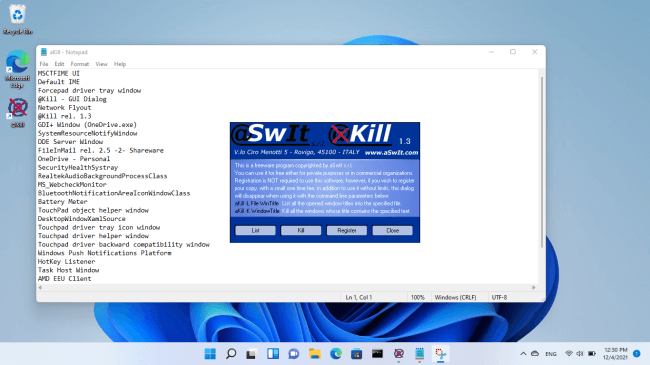
 This freeware utility for Windows 95, 98, ME, NT, 2000, XP, Vista, Windows 7, Windows 8, Windows 10, Windows 11 and Windows Server 2003, 2008, 2012, 2016, 2019, 2022 allows you
to list the opened windows (applications)
on your Windows machine and to kill some of them
by specifing their title.
This freeware utility for Windows 95, 98, ME, NT, 2000, XP, Vista, Windows 7, Windows 8, Windows 10, Windows 11 and Windows Server 2003, 2008, 2012, 2016, 2019, 2022 allows you
to list the opened windows (applications)
on your Windows machine and to kill some of them
by specifing their title.
Unlike other killing utilities it works also with hidden and system windows (for example trayed applications) and you can specify only a PART of the window caption. For example, If you've opened three Windows named Notepad - first.txt, Notepad - second.txt and Notepad - third.txt, you can close all three in once by specifying only Notepad (or only one of them by specifying second.txt) You can also export a list of all the opened windows (or only those that matches a specified title) into a text file, so that an external application can know in advance if a specific application is on execution, so it can decide whether to kill it or not (and which is the exact title to specify). This is possible because @KILL can work also as a command line utility, by passing it some parameters, as described below, so it can be invoked by external applications and batch files. @KILL closes the windows by sending them a WM_CLOSE message, which should be managed by any any well behaved Windows application. Please note however that an application can prompt the user for confirmation prior to destroying a window, so there's no garantee that an application can be really closed by @KILL. You should test it for a specific application before using it in a production environment. @KILL can be invoked with some command line parameters to be used by external applications and batch files: AKILL.EXE -L FileName WindowTitle
AKILL.EXE -K WindowTitle
Important: we have a new code signing certificate that may cause a Microsoft Defender SmartScreen warning after the download until the new certificate gains sufficient reputation. Click here to download
the freeware @Kill rel. 1.3 installer program (919 Kb) If you
want to be informed about bug fixes, improvements, new
releases, and other news about @Kill, please insert
your e-mail address in the following box and
press the Send button. Registration is NOT required to use this software. You can use it for free as long as you want, either for private purposes or in commercial organizations. However, if you wish to register your copy, will a small one time fee, the startup dialog will not be shown when using it with the command line parameters, as described above. |
||||||||||||||||||||||||||||
|
Copyright © 2026 aSwIt s.r.l., Vicolo Castello 3, Italy. VAT ID: IT 01305590299 | Privacy Policy | Cookie Policy |